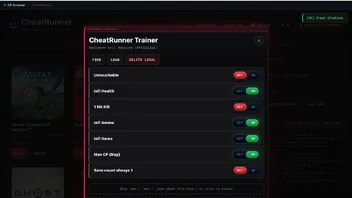
ELF Arsenal (plus)
Der Nachfolger von Sonic Loader, neu benannt und erweitert - entwickelt von soniciso. Eine einzige ELF-Datei, die du an den elfldr deiner Konsole sendest und die Cheats, Speicherverwaltung, On-Screen-FTP, einen Trophäen-Freischalt-Stack, ShadowMountPlus, kstuff-lite, den PS5-Linux-Loader, Lüftersteuerung, NP-Fake-An- und Abmeldung sowie eine vollständige Web-Benutzeroberfläche auf Port :6969 bündelt, sodass alles von jedem Gerät in deinem Netzwerk aus erreichbar ist.
Inhalt
📦 Inhalt
Die einzelne Datei „elf-arsenal.elf“, die du an „elfldr“ sendest, enthält alle unten aufgeführten Teil-Payloads; beim ersten Start muss nichts weiter heruntergeladen werden.
| Sub-payload | What it does |
|---|---|
| kstuff-lite | Userland kernel patches: hijack-check bypass, mount permissions, debug syscalls — boot-time spawned, configurable per-FW. |
| ShadowMountPlus (SMP) | Cross-mount installed games from external storage. Embedded icon = Elf Arsenal art. |
| klogsrv | Forwards /dev/klog to TCP :3232 so the web UI Klog tab + nc <ip> 3232 work. |
| ftpsrv / zftpd | Pick your FTP daemon — bundled ftpsrv (default) or zftpd. Port :2121, anonymous. |
| nanoDNS | Local DNS hijack so api.github.com, git.etawen.dev, codeload.github.com resolve even though Sony's DNS blackholes them. |
| BackPork | Auto-presses "Don't update" on the system-update nag screen. |
| garlic-worker | Background save encrypt/decrypt jobs for garlicsaves.com. Idle-cost ≈ 0. |
| garlic-savemgr | Interactive save manager UI on :8082. |
| np-fake-signin | Forges an offline NP sign-in for the foreground user. Required for trophies on retail. |
| np-fake-signout | Undoes np-fake-signin's signin flags without erasing username / accountId. Use when trophies stop earning on a profile. |
| np-restore-account | Restore registry from a previously-extracted config.dat. |
| trophy-unlocker-all | Legacy SCC-patch trophy unlocker (FW ≤ 6.50). On by default. |
| trophy-unlocker-uds | Universal event-API trophy unlocker (any FW). Off by default — flip on if the legacy one doesn't latch. |
| lapyjb | Per-app jailbreak daemon — replaces etaHEN's HijackerCommand for app PID escalation. |
| dpi | DPI / wake-from-rest auxiliary. |
| ps5-app-dumper | Decrypts owned-game PKGs into a fakePKG-installable form. |
| ps5-linux-loader | Boot Linux on FW ≤ 6.02. Baked in for first-boot install; release picker for upgrades. |
| websrv | The web UI itself on :6969. |
| kmon | Klog scraper that drives the auto-pause / auto-resume of kstuff during launches. |
DNS Setup (nur für Downloads erforderlich
🌐 DNS Setup (nur für Downloads erforderlich)
Die Standard-DNS von Sony blockiert Community-Domains. Damit Elf Arsenal neue Payloads (kstuff / SMP / Linux-Loader-Picker) abrufen, Homebrew-Apps installieren oder den Garlic Worker ausführen kann, benötigt die PS5 eine DNS, die git.etawen.dev, api.github.com usw. kennt.
PS5 → Einstellungen → Netzwerk → Internetverbindung einrichten → Benutzerdefiniert → DNS Einstellungen → Manuell, trage dann eine der folgenden Adressen als primären DNS ein:
| DNS-----------IP | Was ist das? | Wann ist die Verwendung angebracht? |
|---|---|---|
| 127.0.0.1 | integriertes nanoDNS (läuft auf der Konsole selbst) | für die meisten Anwender am besten geeignet – funktioniert vollständig offline |
| 62.210.38.117 | Nomadic DNS (von der Community betriebener Mirror) | Ausweichlösung, falls du nanoDNS nicht ausführen möchtest |
Alles, was keinen Download aus dem Internet erfordert (Sideloading, Trophäen, CheatRunner, SDK Rewriter, automatisch installierte Patches), funktioniert auch ohne DNS weiterhin.
Vollständig offline? Nutze das Offline-Paket
🔌 Vollständig offline? Nutze das Offline-Paket
Falls deine PS5 keinen Internetzugang hat oder haben darf, lade dir die ZIP-Datei mit dem vorgefertigten Offline-Paket von der Seite „Releases“ dieses Repositorys herunter (elf-arsenal-offline-pack-YYYY-MM-DD.zip).
Option A — Mit einem Klick (erfordert einmalige DNS-Einstellung):
- In Elf Arsenal: Settings → 🔌 Offline pack → ⬇ Download pack from git.
- Warte auf "ready to extract", klicke dann auf 📦 Extract now.
- Schalte den Offline mode auf "ON". Du kannst die DNS-Verbindung jetzt dauerhaft trennen.
Option B — vollständig offline (kein DNS):
- Lade auf einem PC mit Internetverbindung die ZIP-Datei des Offline-Pakets von der Seite „Releases“ herunter (oder erstelle es selbst mit tools/build-offline-pack.sh).
Verbinde dich per FTP mit deiner PS5 (Port 2121, anonym) und lege die ZIP-Datei genau hier ab:
- In Elf Arsenal: Settings → 🔌 Offline pack → ↻ Refresh status → 📦 Extract now.
- Schalte den Offline mode auf "ON".
UI Tour
🛠 UI Tour
| Registerkarte / Bereich | Zweck |
|---|---|
| Home (carousel) | Ein Kachel-Launcher, der deine installierten Spiele anzeigt. |
| 🐧 PS5 Linux (FW ≤ 6.02) | Ein-Klick-Funktion „Jetzt starten (Linux booten)“ + Versionsauswahl. |
| Klog | Live /dev/klog Ende. Filtern, Anhalten/Fortsetzen, Löschen. |
| Files | FTP-ähnlicher Manager über USB, erweiterter Speicher, /data, /system_data. |
| Stats | CPU/SoC/M.2 temps (toggle °C/°F), fan threshold, klog buffer depth. |
| Settings | Alle Schaltflächen des Ladeprogramms – siehe Abschnitt „Einstellungen“ weiter unten. |
| ❓ Help | Eine Dokumentation für jeden einzelnen Abschnitt unter „Settings“. |
Settings Abschnitte (Highlights)
In der Seitenleiste sind alle Abschnitte unter sechs Registerkarten zusammengefasst: Appearance, JB & kernel, Games & storage, Mods, Profile, System. Wähle die Registerkarte aus, die deinem Anliegen entspricht.
- 🎨 Appearance — theme picker, °C/°F toggle, 🌍 Language, HLTB overlay, home-tile auto-update.
- ⚙ JB & kernel — kstuff release picker, BackPork, nanoDNS, Y2JB autoloader sync, Managed Payloads, Bulk SDK rewriter.
- 📀 Games & storage — ShadowMountPlus, App Dumper, Homebrew installer, PKG Installer, PKG Zone catalog.
- 🎮 Mods — cheat engine + cheat-repo downloader.
- 🪪 Profile — Avatar Maker, NP fake sign-in / sign-out, NP account restore, Offline account activation.
- 🛠 System — FTP server, Fan control, Garlic Worker / SaveMgr, PS5 Linux loader, Backups & Restore, 🔌 Offline pack, Background services.
🧩 PS4-FPKG-Datenbank neu aufbauen (einen „Rebuild Database“-Vorgang von Sony überstehen)
Sonys „Rebuild Database“-Funktion im abgesicherten Modus entfernt PS4-fpkg-Titel (CUSA…) aus der Anwendungsdatenbank – sie verschwinden vom Startbildschirm, obwohl die Spieldaten weiterhin auf der Festplatte vorhanden sind. Elf Arsenal kann sie wiederherstellen, mit den korrekten PSN-Konzept-, Grafik- und Start-Metadaten, sodass sie ordnungsgemäß neu starten – vollständig offline (ohne PSN, ohne Netzwerkverbindung).
Du findest diese Option unter Settings → "Rebuild PS4 FPKG DB".
Die einzige zwingende Vorgabe: Speichere fpkg nicht auf dem internen Speicher
Bei einem Neuaufbau der Datenbank werden interne fpkg-Daten (unter /user/app) gelöscht – diese können nicht wiederhergestellt werden. Daten auf dem erweiterten Speicher bleiben erhalten. Verschieben Sie daher alle fpkg-Spiele, die dir wichtig sind, nach:
- M.2 (NVMe extended storage) — überlebt immer einen Neuaufbau der Datenbank (empfohlen).
- USB extended storage — überlebt nur, wenn das USB-Laufwerk vor dem Neuaufbau der Datenbank entfernt wird. Trenne das USB-Laufwerk von der PS5, bevor du mit dem Neuaufbau der Datenbank beginnst, und verbinde es wieder, sobald die Konsole hochgefahren ist. (USB-Titel werden dann vom System selbst neu registriert; dieses Tool stellt hauptsächlich die M.2-Titel wieder her.)
Verschiebe Spiele über Settings → Storage auf der PS5.
So funktionieren die Backups
Elf Arsenal speichert wortgetreue Momentaufnahmen der Startregistrierung jedes fpkg-Titels im Verzeichnis /data/FPKGDBBCKUP/ (auf dem Verzeichnis /data, das bei einem Neuaufbau nicht berührt wird). Dies ist notwendig, da ein Feld – die vom System berechnete Installationsgröße – nicht allein anhand des Pakets reproduziert werden kann; daher sorgt eine wortgetreue Zeile dafür, dass der Titel gestartet wird, anstatt eine Store-Seite mit der Option „Produkt anzeigen“ anzuzeigen.
- current/ — der aktuellste Snapshot. Ein schlanker Daemon überwacht die Anwendungsdatenbank und aktualisiert diese automatisch nach jeder Installation, jedem Verschieben oder jedem Hinzufügen eines SMP.
- previous/ — den letzten funktionierenden Snapshot aus der Zeit vor deiner letzten Installation. Bei jeder neuen Installation kopiert der Daemon den aktuellen Stand in den vorherigen Ordner, bevor er das neue Spiel einbindet, sodass der vorherige Ordner immer genau eine Installation hinterherhinkt. Sollte eine Neuinstallation die Datenbank beschädigen, stelle den vorherigen Stand wieder her, um diese eine Installation sauber rückgängig zu machen.
Ein 💾 Backup now Button (auf der Metadaten-Karte) löst sofort eine Momentaufnahme aus – praktisch, bevor man einen Neuaufbau auslöst, auch wenn der Daemon die Daten ohnehin bereits auf dem neuesten Stand hält.
Wiederherstellung nach einem Neuaufbau der Datenbank
- Stelle sicher, dass sich deine fpkg-Spiele auf dem M.2-Laufwerk (oder einem USB-Stick, der wie oben beschrieben während des Neuaufbaus der Datenbank abgezogen wurde) befanden, bevor du den Neuaufbau durchgeführt hast.
- Öffne Settings → Rebuild PS4 FPKG DB.
- Wähle das Backup-Set aus: aktuell (normal) oder vorheriges (Rollback auf den Zustand nach der Installation, falls eine fehlerhafte Installation Daten beschädigt hat).
- Drücke ⟳ Rebuild FPKG DB. Die Einträge werden wiederhergestellt und der Startbildschirm wird aktualisiert; die Spiele werden aus dem erweiterten Speicher gestartet.
Bei einem Neuaufbau werden interne und M.2-Titel stets anhand ihres tatsächlichen Speicherorts auf der Festplatte neu registriert (param.sfo + Artwork + Sonys Offline-Konzeptkarte /system/priv/mms_ro/concept_title.db), sodass die Zeile immer mit dem tatsächlichen Speicherort der Daten übereinstimmt. USB-Titel behalten ihre laufwerksspezifische ID, sodass diese unverändert aus dem Backup wiederhergestellt werden (oder vom System beim erneuten Anschließen neu registriert werden).
Spiele zwischen Laufwerken verschieben (automatische Wiederherstellung)
Das Verschieben eines fpkg-Spiels zwischen internem Speicher ⇄ M.2 ⇄ USB führte früher zu einem Absturz: Die 0555-Sperre blockiert den Schritt „alte Kopie löschen + Registrierung neu schreiben“ des Verschiebungsvorgangs, sodass das Spiel letztendlich auf dem ursprünglichen Laufwerk registriert bleibt, während sich die Daten auf dem neuen Laufwerk befinden – die Konsole meldet dann „Kann nicht gestartet werden, beschädigte Daten“. Die Daten waren immer in Ordnung; nur die Registrierung war veraltet.
Dies wird nun automatisch behoben. Etwa 15 Sekunden nach Abschluss eines Zuges führt der Daemon folgende Schritte aus:
- re-points the registration auf das Laufwerk, auf dem sich das Spiel tatsächlich befindet (Neusynchronisierung für interne/M.2-Laufwerke), und
- sweeps the orphaned leftover copy vom alten Laufwerk (dadurch wird der veraltete Ordner entsperrt und anschließend gelöscht), wodurch auch verhindert wird, dass das System ihn beim nächsten Einbinden erneut als „externe“ Phantom-App importiert.
Du kannst denselben "Heilzauber" auch jederzeit manuell auslösen mit ⟳ Rebuild FPKG DB.
Folder locking. Das Tool setzt den Ordner „CUSAxxxxx“ jedes Spiels (unter /user/app, /mnt/ext0/user/app, /mnt/ext1/user/app) auf 0555, während die Inhaltsdateien (*.pkg, *.json, *.pbm, *.pbm.backup, *.xml) auf 0777 belassen werden. Das Löschen einer Datei erfordert Schreibrechte für den übergeordneten Ordner, sodass ein Ordner mit der Berechtigung 0555 den gesamten Inhalt unlöschbar macht – dennoch kann der Launcher die Dateien mit der Berechtigung 0777 weiterhin durchsuchen (x) und lesen (r), sodass das Spiel normal läuft. Übersteht einen Sony-DB-Neuaufbau / GC.
Um ein geschütztes Spiel über die PS5-Benutzeroberfläche zu verschieben, zu löschen oder neu zu installieren, tippe zunächst auf 🔓 „Entsperren“ für Verschieben/Löschen (auf der Karte „Neu erstellen“ – setzt die Ordnerrechte auf 0777 zurück); die Spiele werden nach dem nächsten Verschieben oder Neuerstellen automatisch wieder gesperrt. Bei einem normalen Verschieben ist dies nicht erforderlich – der Daemon entsperrt während des Verschiebens und die automatische Wiederherstellung räumt anschließend auf –, bei einer Deinstallation oder Neuinstallation über die vorhandene Installation jedoch schon.
Changelog
v1.6.23
Firmware coverage, a PKG installer that takes links, and a download queue that
stops hiding what it is doing.
PKG Installer
Install from a link. Paste URLs one per line, or give it the address of a
page that lists them — an archive.org item, an open directory index, anything
that is just anchors — and the console reads that page and hands back the .pkg
links to pick from. Doing the fetch on the console also sidesteps the CORS
refusals a browser would hit. Links go on a queue with a single worker, since
installs serialise down there anyway; it reports per-item state and refuses
duplicates that are still pending.
Firmware coverage
Every payload is rebuilt against the current SDK, so all of them now carry the
full 3.00–13.60 dispatch. zftpd was the one that mattered: it stopped at 10.60
and was reachable from the FTP daemon switch. The firmware check that catches
this now also runs on the argv spawn path, which was skipping it.
The ShellCore PPR patch gains tables for 6.50 and 10.60, taking it to 50
of 51 firmwares — only 9.05 is missing, and no image for it exists to derive one
from. Both new tables were carried over from neighbouring firmwares rather than
read off a console; tools/verify-firmware-tables.py checks every table against
a real firmware image and all 51 pass, 561 sites, nothing failing. The same tool
verifies kmonitor's kernel offsets against decrypted kernels — 51 of 52.
The patcher now looks before it writes. Each entry replaces a specific
instruction, and nothing checked that the instruction was there; an offset that
did not describe the running build was written anyway. Anything unexpected is
skipped now, which is also what makes a derived table safe to ship.
v1.6.22
Bumps embedded garlic-worker to v1.1.5.
Worker changes:
- copy_dir_recursive (PS5) + copy_dir_pfs (PS4) now check copy_file return codes and fail loudly instead of silently truncating. Encrypt paths bail with an ERROR log + save_unmount if the copy step fails (out of space or otherwise). Latent hazard closed — server-side saveblocks-headroom already prevents the ENOSPC case in the wild.
- User-Agent bumped from sonicloader-worker/v1.1.4 -> sonicloader-worker/v1.1.5 so HTOS-web can distinguish updated vs stale workers in the fleet.
Build pipeline:
- Top-level workflow now rebuilds payloads/garlic-worker.elf from garlic-worker-src/ on every push instead of shipping a stale pre-committed binary. Future worker source edits flow into the fleet automatically.
v1.6.21
Bluesky links replace X/Twitter in UI and launcher. README cleaned up.
v1.6.19
What's fixed
Fan Override (was completely broken)
- Root cause: fanThreshold/fanTarget were defined in App but never passed as props to the Settings component — every toggle call was /api/fan/set?temp=undefined, and the toggle silently did nothing. Fixed.
- Disabling fan override now persists across Arsenal restarts — /api/fan/unpin now calls config_save() so fan_threshold=0 is written to disk.
- Fan watcher already re-applies the pinned threshold every 15 s to fight the firmware's automatic reset on game launch (was always there, now actually reachable).
Config self-healing (also fixes Settings page flicker and language oscillation)
config.ini had been silently corrupting itself in a loop:
- stringifyINI turned flat C keys (fan_threshold=0) into character-indexed INI sections ([fan_threshold] / 0=4 / 1=0).
- config_preserve_ui_sections faithfully re-copied every section it found — including the garbage ones.
- Repeat forever.
Both sides fixed:
- stringifyINI now writes root-level primitives (flat C-backend keys) as verbatim key=value lines before emitting any [Section] blocks.
- config_preserve_ui_sections switched from deny-list to allow-list — only [Settings], [Sentinel], [Experimental], [CustomPaths], [Blacklist], [AutoPayloads], [PKG] are preserved. Garbage sections and the legacy [FanControl] block are silently dropped on every save.
- Arsenal rewrites config.ini immediately on boot, so any corrupt config left by an older version is self-healed on the first run of v1.6.19 — no manual steps needed.
BackPork stripped
Removed from all sources (Makefile, sys.c, sys.h, config.c, websrv.c, main.c).
Upgrade notes
Nothing to do. Just deploy — the corrupted config.ini is cleaned automatically on first boot.
v1.6.8
What's new
Web UI
- PS5 browser loads ~50× faster — JSX + Tailwind precompiled at build time. 547 KB inline HTML → 11 KB shell + separately cached 519 KB app.js.
- Mobile layout — clean responsive layout on phones (iOS Safari, Android Chrome): bottom nav, 2-column portrait grid, proper touch targets. Desktop unchanged.
- Mobile game cards — info/favorites/hide quick-action buttons on phones. Hidden on PS5 and desktop.
Cheat engine
- FW 12 execute-only page fix — mprotect() before pt_copyout() makes SHN/MC4 cheats work on FW 8.40+ including FW 12.
File manager
- Full in-browser file manager under the Files tab — browse, copy, move, delete across /data, /user, /system_data, USB/ext.
DNS
- NomadicDNS (62.210.38.117) is retired and no longer works. Use 127.0.0.1 (nanoDNS, bundled, on by default).
- Network not connecting after JB? Wait for Arsenal to start, then Settings → Network → turn off then on.
v1.6.7
- feat: fpkg guard defaults to unlocked with persistent lock/perm-unlock
v1.6.6
- FW Spoof fix: payload now applies the version you enter (e.g. 9.60) — previously hardcoded 99.99 and ignored your input
- klogsrv visibility: fw-spoof output now goes to stderr and appears in the klog viewer
- UI clarification: ps4_sdk_version and upd_version are patched (games/update checks); PS5 Settings "System Software" reads a separate sysctl and is unaffected
- DPI fix from v1.6.5 still applies (10.xx/11.xx authid + timing)
v1.6.5
DPI — fixed for FW 10.xx and 11.xx
Root cause: DPI v1 calls sceAppInstUtilInitialize() at startup before kstuff has launched and patched the kernel. The 10-second timeout fired first → init_rc = -0xDEAD → all installs silently failed. On FW 11.00+, SYSTEM_AUTHID is also required and was never set on the spawned DPI process.
Fixes:
- DPI v1: 25 s startup sleep so kstuff is ready before AppInstUtil init
- DPI v1: lazy retry on each failed install request (catches late IPMI)
- DPI v1 + v2: Arsenal now calls jb_escalate_pid() after spawning DPI (same pattern as CheatRunner) — grants SYSTEM_AUTHID for FW 11.xx+
- DPI v2: bind retry with backoff instead of silent immediate exit
- Both: diagnostic stderr logs now visible in klogsrv
Previous releases also in this build:
- fw-spoof 10.xx KP fix (8-byte needle + scan limit)
- Toggle toasts fixed (lapyjb/CheatRunner/FPKGGuard/DPIv2)
- autoload.txt overwrite removed from migration
v1.6.4
Cheat engine improvements
- Cheat game list fix: After a full repo download, the staged-cheat game list was always empty because list_cheats() only scanned the flat root — all downloaded files live in json//shn//mc4/ subdirs. Now scans all four paths; 3000+ titles correctly appear.
- Format selector tabs: When multiple formats exist for a game (e.g. SHN + MC4), tab buttons appear above the cheat list so you can pick which version to load. Example: Dead Space SHN → 1 cheat, MC4 → 10 cheats. Tabs are hidden for single-format games.
XML patches (from v1.6.3)
- Global toggle + per-patch enable/disable across all three CheatRunner scan dirs
- Upload new XML patch files from the browser
- Source badges (Arsenal / CheatRunner / CheatRunner PS5)
Plugin loader (from v1.6.3)
- Drop .elf files into /data/elf-arsenal/plugins/ and manage them from Settings
v1.6.3
- DPI v2 (etaHEN-compatible HTTP installer on port 12800) bundled
- Switch between DPI v1 (loopback :9040) and DPI v2 (HTTP :12800) from Settings → PKG Installer → DPI version
- Mutual exclusion: switching version SIGKILLs the old daemon before starting the new one
- DPI version choice persists across reboots via config.ini
- Accurate DPI status badge (v1/v2/not running)
- i18n on all pages + full Google Translate language list
v1.6.2
💙 Apology — unstable build on 2026-05-26
Yesterday's build caused the game library to show Loading… on the main page (a fresh load showed a blank grid; Refresh fixed it). Root cause: removing the cheats section FTP how-to block left a setup-time JS crash on a missing DOM element (), aborting the boot IIFE before could run. Fixed in the latest build. Hard-refresh the page after re-sending the ELF.
Sorry for the disruption — thank you for the patience and the reports. ❤️
⚠️ If you ran an early v1.6.2 build and are getting KPs
Delete /data/elf-arsenal/ from the console (via FTP or another payload), then re-send this ELF. The fresh first-boot pass will recreate it cleanly. This wipes saved settings but fixes the corrupt config left by the early build.
What's New in v1.6.2
ⓘ Game Info Button on Every Tile
- Small ⓘ button now sits in the bottom-right corner of every game tile in the grid
- Fetches a Wikipedia summary (title, description, thumbnail) for that game
- Tap ⓘ to get info without launching or changing the spotlight
⏻ Power Controls
- Power button added to the header
- Reboot and Shutdown via the FreeBSD reboot(2) syscall — works on devkit and retail
- 5-second countdown notification before the console drops
✕ Kill & ⓘ Game Info (Spotlight Panel)
- Kill button — clean shutdown first, SIGKILL fallback after 3s grace
- Info button — fetches a Wikipedia summary for the running game
▶ Now-Playing Spotlight
- While a game is running the spotlight locks to that title with a Now playing eyebrow
- Hovering other tiles does nothing while a game is up; clicking goes straight to launch
- Returns to normal Selected title behaviour when back in VSH/XMB
🎮 CheatRunner — Back to Elf Arsenal button
- The 🎮 Cheats nav link now opens a wrapper page at the same port as EA
- Dark topbar with an ← Elf Arsenal back link sits above CheatRunner's UI in an iframe
🏆 Trophy Toggle Fix
- Checkboxes now reflect the configured enabled state (config.ini), not whether the process is running
- Fixed the click → Running → back to Off flicker bug
- Renamed: Unlock Only (legacy, default ON) / Unlock + Earn (allfw, default OFF)
🎮 Cheats Section Simplified
- Removed cheat engine toggle, FTP how-to, search staged cheats, cheats-for-running-game, and auto-apply patches panels
- Kept only the Auto-download entire cheat repository block — CheatRunner handles everything else
🌡 M.2 NVMe Sensor
- Temperature gauge restored on the homepage
- Only shown on systems with an M.2 drive installed (empty slot returns 0 °C — now filtered out)
🔍 Settings Search — Cross-Category
- Search now spans all categories at once, not just the active tab
- Clearing the query restores normal category navigation
🔧 CheatRunner from GitHub
- CheatRunner ELF is fetched from GitHub releases at build time
klogsrv
- Rebuilt with persistent loop — no more notification spam from watchdog respawns
- Trophy ELFs reverted to pre-B2 May 23 build (fixes NpAsmClient injection errors on B2)
v1.6.1
Auto-cut for the offline pack zip. See commit 842119f. Pack contains: kstuff (3 sources), SMP 1.6test11, Linux loader v2.1, Y2JB autoloader, tile pkg, OffAct+PKGInstall, 3 cheat repos, manifest. FTP the zip to /data/elf-arsenal-offline-pack.zip then Settings -> Offline pack -> Extract now.
v1.6.0
First Elf Arsenal release.
- Rebrand from Sonic Loader
- Baked-in PS5 Linux loader (v2.1) for first-boot install on FW ≤ 6.02
- np-fake-signout payload (preserves username + accountId)
- Background-services JSON fix (toggles hit /api/state now)
- Trophy UDS daemon defaults to OFF; legacy launcher-patch defaults ON
- Auto-apply patches nested into the Cheat engine settings section
- nanoDNS gate on every boot-time HTTP poller
- One-shot sonic-loader.elf -> elf-arsenal.elf migration for upgrading users
- SDK update to v0.39 (clang 19.1.7)