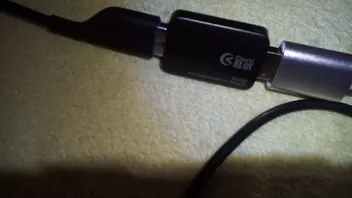
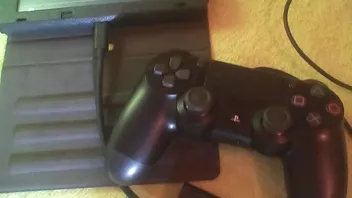
Nintendo Switch Controller Converter für PS3/PS4/Xbox one controller !!

  • Converter für die Nintendo switch Konsole ab sofort bei http://3ds-flashcard.com/36-nintendo-switch zum kaufen !

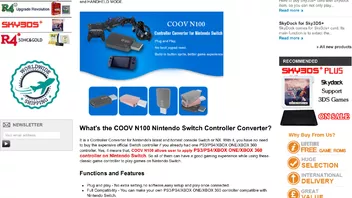
    COOV N100 is Nintendo Switch Controller Converter for PS3/PS4/XBOX ONE/XBOX 360Controller owners. Buy COOV N100 you can combine NX/Switch with your previous and classic video game console controllers such as PS3/PS4/XBOX ONE/XBOX 360 ones. This is a cheap and easy to use controller converter for Nintendo Switch, get from us you can enjoy the free shipping, promo code and warm after-sale service.
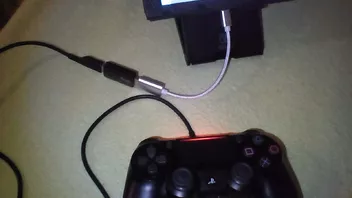
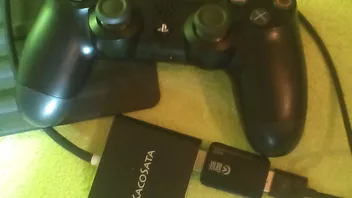
  • Funktioniert tadellos mit einen PS4 Controller ! Auch mit den Kacosata Adapter !

  • Update 2.2 ist da !

    • Go to http://www.mycoov.com to download and firmware, you should unzip the file to get firmware.bin.
    • Insert the COOV N100 to our PC usb port, then a disk called COOV N100 will be popping up.
    • Drag and copy the firmware.bin file to the disk of COOV N100.
    • If the upgrade finished, the green light on COOV N100 will flash within 1 to 2 seconds. However, if you can only see the red light, then update is faile

    Der Inhalt kann nicht angezeigt werden, da Sie keine Berechtigung haben, diesen Inhalt zu sehen.

  • Update auf 2.04 + Splatoon Platter ! Funktioniert auf der Firmware 4.0.1 auch !

    Der Inhalt kann nicht angezeigt werden, da Sie keine Berechtigung haben, diesen Inhalt zu sehen.

    Der Inhalt kann nicht angezeigt werden, da Sie keine Berechtigung haben, diesen Inhalt zu sehen.

  • Stecke mal an und aus ich habe ihn über den Kacosata Adapter laufen habe leider keine originale Dock mehr !

    P.s. hast du es über ein verlängerungskabel laufen !

    P.s. probiere es mal mit einen anderen USB kabel ich habe es von einer xbox one genommen

    Leuchted er grün oder blau ?

    Bei mir funktioniert vibra und bewegungssteurung auch mit einen ps4 controller

    P.s. kabellos funktioniert er nicht da brauchst den Myflash Adapter

    Bei super Mario geht auch alles perfekt mit einen ps4 controller

  • Blinken darf er nicht und gar nicht weiss da passt was mit der software nicht ! Entweder blau oder dunkel ! Ok nimm mal ein anderes USB kabel oder mache nochmals die Firmware drauf

    Welchen controller verwendet du

    Hast im Menü auf kabel controller ein geschalten und bei der controller Einstellungen die controller abgemeldet

    Auf Systemeinstellungen

    Controller und Sensoren

    Kabelverbindung pro controller ein schalten und vibra auf ein


    Und ganz unten gehe mal auf Synchronisierung von controllern aufheben

  • Update 3.0

    Der Inhalt kann nicht angezeigt werden, da Sie keine Berechtigung haben, diesen Inhalt zu sehen.

    Changelog

    21 July 2017 – V1.01:
    1. Added support for Xbox One Elite Handle
    2. Increase the filtering mechanism for rocker rebound jitter


    02 August 2017 – V 1.02:
    1. Increase the joystick calibration function
    2. Added support for a pirated PS4 handle

    10 August 2017 - V 2.01:
    1. Support vibration
    2. Support somatosensory connection (PS4 handle only)
    3. Support part of the host with automatic identification function of the handle, such as BTP-BD2E
    4. Vibration function stability repair

    Note: Set "Pro Controller Wired Communication" to ON

    15 August 2017 - V 2.02:
    1. Vibration function stability repair
    2. Joystick optimization

    20 August 2017 - V 2.03:
    1. Trigger key burst and map function repair
    2. 2.x version configuration mode vibration prompt repair
    3. Increase the vibration switch and the intensity adjustment function

    23 August 2017 – V 2.03B:
    1. Domestic PS4 handle and wireless PS4 receiver driver compatibility compatibility, the temporary removal of domestic support PS4 handle

    09 Semptember 2017 - V 2.04
    September 9, 2017 (V2.04):
    1. Stability fixes, to solve the problem of abnormal triggering
    2. Support SWITCH access to multiple COOV N100 at the same time
    3. Support access to Nintendo SWITCH PRO handle
    4. Support Mad Catz PS4 handle and PS4 wireless receiver
    5. The vibration intensity in the default state is adjusted to low, not closed

    30 November 2017 -V3.0
    1. Support XBOX ONE host, with the original handle to guide
    2. Support PS4 host, need to cooperate with the original handle guide
    3. Support connection keyboard, mouse, HID handle, HID fighting joystick control, to be with the COOV HUB K4
    4. NS mode rocker smooth and smooth optimization
    5. Multiple handle connection optimization
    6. Support the handle button mapped to the keyboard and mouse rocker

  • Update auf 3.4 ! mit Maus und Tastatur unterstütztung (Splatoon2)

    December 12, 2017 (V3.4)
    1. In the key map configuration process, filter out mouse touch error
    2.PRO handle support optimization, the main solution to some input conflicts
    3. Repair XB1 handle LT RT data abnormal situation
    4. Repair a key trick strokes and even strokes interfere with the problem
    5. Fix a data processing logic problem

    Der Inhalt kann nicht angezeigt werden, da Sie keine Berechtigung haben, diesen Inhalt zu sehen.

  • Update auf 5.2 ab sofort auch Android Tablets TV Boxen verfügbar der Adapter !

    February 05, 2018 (V5.0)
    1. Support four groups of independent configuration of real-time switching: V5.0 firmware can save 4 groups of configuration, start loading default configuration of the first group. Inter-group configuration does not interfere with each other, you can use the HOME + LB or HOME + RB fast switch. Switching, there will be LED (red, green, blue, yellow) and vibration tips
    2. Support Android system (mobile phone, tablet, TV box)
    3. Support by closing the linear to enhance even strokes recording time
    4. Increase the linear level (key process) Custom: adjust the left and right joysticks and left and right triggers linear level, each with seven stalls, the key process as follows: 100%, 80%, 66%, 50%, 25% , 12%, 1%. 100% of the key stroke is equivalent to the linear open state, 1% key stroke is equivalent to the linear closure.
    5. A key trick: Up to 10 groups can be recorded, the shortest recordable single-group 2.5 seconds, the longest record of a single group can be more than one hour. In addition, multi-cascade connection is supported. When the recorded data exceeds the length of a single group, the idle group cascade is automatically used. In this mode, continuous recording can be performed for 25 seconds even if the joystick is turned continuously (linearly on).
    6. Use the key lock + even strokes function infinite loop, lift the key lock will immediately stop the loop
    7. Optimize the vibration of the pro handle support

    Der Inhalt kann nicht angezeigt werden, da Sie keine Berechtigung haben, diesen Inhalt zu sehen.

  • Update auf 5.3

    Der Inhalt kann nicht angezeigt werden, da Sie keine Berechtigung haben, diesen Inhalt zu sehen.

  • Danke für die Info aber den hatte ich schon 2x ausgetauscht da er nicht ging und nicht mehr genommen !

    Ich habe diesen als zweit Adapter für die switch mit einen Wii u pro controller

    http://www.mayflash.com/Products/NINTENDOWiiU/W009.html

    Trotzdem danke

  • Danke für die Info aber den hatte ich schon 2x ausgetauscht da er nicht ging und nicht mehr genommen !

    Ich hatte asm Anfang arge probleme, der Adapter muss rot leuchten, damit die Controller fiunktionieren und vorher separat mit USB kabel zwischen Controller und Adapter verbinden, damit die Controller synchronisiert werden können.

    PS: Inwieweit ging der Adapter nicht? Denn 2mal gekauft und geht immer noch nicht. Wenn er schon einmal nicht geht, würde ich kein zweites mal kaufen.

  • Update auf 5.4

    Fix K4 mouse and keyboard can not use the problem

    Der Inhalt kann nicht angezeigt werden, da Sie keine Berechtigung haben, diesen Inhalt zu sehen.

  • Es geht Leute mit den Logitech G27 seit dem Update 5.4 bin voll ausser Häuschen Leute

    TESTE ES JETZT AUSGIBIG UND MEKDE MICH WIEDER..

    Upie upie Gears Club mit G27

    :uweg: :huepfer: :laola:

  • Danke habe ich schon gesehen und werde es auch bestellen danke für den Tipp

    Hier geht es weiter mit den Tests und schon erfolgreich


    STEERING WHEELS AUF NINTENDO SWITCH VERWENDEN !

Jetzt mitmachen!

Sie haben noch kein Benutzerkonto auf unserer Seite? Registrieren Sie sich kostenlos und nehmen Sie an unserer Community teil!