


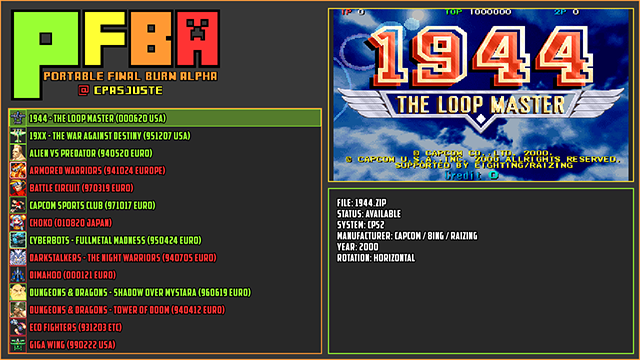
pFBA ist wie man dem Namen entnehmen kann eine Portierung des berühmten Multi-Arcade-Emulators Final Burn Alpha für die Switch und PS Vita
Hauptziele:
- Benutzerfreundliches Interface auf nicht-Windows-Geräten
- Nutzung eines aktuellen Rendering-Interface für Geschwindigkeits- undt Effekteunterstützung
- Cross-Plattform und Code-Portability
- einfache Updates des fba-Kerns (keine Modifizierungen an den originalen Quellen)
- Nutzung des ARM-ASM-m68k-(cyclone)-Kerns auf ARM-Geräten
Derzeit unterstützte Geräte:
- Linux (sdl1, sdl2)
- Sony Ps Vita (vita2d)
- Nintendo Switch (libnx, sdl2)
Allgemein Informationen:
- pFBA support console roms (Sega MegaDrive, Sega GameGear, Sega Master System, Nec PC-Engine, Nec TurboGraFX-16, Nec SuperGraFX, Coleco, SG-1000 and MSX). Here is the corresponding folders where roms should be located (as stock fba):
Sega MegaDrive : megadriv
Sega GameGear : gamegear
Sega Master System : sms
Nec PC-Engine : pce
Nec TurboGraFX-16 : tg16
Nec SuperGraFX : sgx
Coleco : coleco
SG-1000 : sg1000
MSX : msx
- pFBA support title, preview, and icon images in "png" format. Titles goes in the "titles" folder, previews in the "previews" folder, and icons in the "icons" folder. They must have the same filename as the zipped rom, but with a ".png" extension instead ".zip". For consoles images, you need to add the console driver prefix to the image filename ("sonic.zip" image for Sega MegaDrive would be "md_sonic.png").
- You can enable or disable icon images from the pFBA main menu. A restart is required to enable the changes.
NINTENDO SWITCH INFORMATION'S
GENERAL INFORMATION'S
- Using icons on the Nintendo Switch will make main loading time longer if a lot of icons are detected. There's currently no plan to improve this.
- You can enable or disable single joycon support from the pFBA main menu (+). When enabled, all detected joycons (not docked) will be handled as a single controller/player.
- Point scaling is currently limited to 1x, 2x and 3x size. FIT, FIT 4/3 and FULL options will fallback to 3x.
Installation (Switch):
- kopiert den pfba-Ordner in den switch-Ordner auf der µSD-Karte
- kopiert die Roms in den/switch/pfba/NamedesSystems/-Ordner auf der µSD-Karte (ich poste euch mal die richtigen Verzeichnisse)
- pfba/megadriv
- pfba/gamegear
- pfba/sms
- pfba/coleco
- pfba/msx
- pfba/sg1000
- pfba/pce
- pfba/tg16
- pfba/sgx
Steuerung:
im User-Interface:
-
 /
/  : SWITCH FROM TITLE TO PREVIEW IMAGE
 -
 : GENERAL OPTIONS + DEFAULT ROMS OPTIONS
 -
 : PER ROM OPTIONS
 -
 : ROM starten
IN-GAME
-
: START
-
: COINS
-
/ + : START
-
 /
/  +
+  : COINS
 -
/ +
 : SERVICE SWITCH
 -
/ +
 : 1P + 2P START
 -
/ + / : PFBA MENU
-
+ : UNIBIOS MENU (NEOGEO ONLY)
Thanks
- Xavier for the support (http://www.consolex-bordeaux.fr/)
- ScHlAuChi for all the advices and testing
- fba/mame authors (http://www.fbalpha.com/, http://mamedev.org/)
- xerpi for vita2d (https://github.com/xerpi/libvita2d)
- frangarcj for vita2d shader support (https://github.com/frangarcj/vita2dlib)
- people behind the vitasdk (https://github.com/vitasdk)
Download:
--> https://github.com/Cpasjuste/pemu/releases
Changelog
v3.4
- pfba: add spectrum hardware roms filter
- pfba: fix spectrum roms not detected/handled correctly
- pfba: fix crash on some roms (Forgotten Worlds cps1, gaiapols...)
- pfba: remove now unnecessary force 50hz option
- pfba: update fba to latest git (2019-03-28)
- pemu: menu: add main/roms options delimiter
- pemu: menu: make options values wider, change selected option value color, set highlight size to selected value
- pemu: fix ui inputs changing with roms inputs change
v3.3
- pfba: fix "FORCE_60HZ" option not always applied
v3.2
- pfba: neogeo: fix bios selection, add unibios 3.3 support (needs "uni-bios_3_3.rom" in neogeo.zip)
- pfba: neogeo: use "COINS + FIRE3" for service switch, "COINS + FIRE4" for "P1/P2" switch (this leave START for in-game unibios menus (http://unibios.free.fr/howitworks.html)
- pfba: fix audio interpolations options
v3.1
- skins: use zipped skins (put zipped skins in "skins" directory)
- skins: add skin selection to main options menu
- skins: change "skin" path to "skins"
- skins: change "ROM_ITEM" name/type to "TEXT"
- skins: add "color_missing", "color_not_working" and "highlight_use_text_color" options to "ROM_LIST > TEXT" skin config
- options menu: set states options menu at the first place, for easier in game access
- states menu: fix bug to return to main menu with back button
- states: allow loading a rom with it's state from the main rom menu
- states menu: add tween position for a better effect
- switch: input: use joystick click/press for either start (left joycon) or select (right joycon) on single joycon mode
v2.0
- use OpenGL for rendering, which allow some nicer ui effects, and of course, more power (thanks armada, fincs, subv... for theire work on mesa/nouveau)
- point filtering can now be used in any rendering size
- add a few libretro shaders (retro-v2, scanlines, pixellate, crt easymode, crt geom, sharp bilinear, sharp bilinear scanlines, sabr v3, xbrz, supereagle). Note that some shader will work better in integer scaling (2x, 3x), and some will have a better effect with linear filtering (sharp bilinear). Also, some are very intensive (crt geom, sabr, xbrz) and may not work fullspeed in some emulators (pSNES).
- add fps counter option
v1.58
- try to fix docked mode (untested, thanks m4xw for the tips)
v1.57
- change ui font
- change buttons configuration (see readme at https://github.com/Cpasjuste/pfba)
- add possibility to display icons (32x32 png in the "icons" folder). Can be enabled or disable from pFBA options menu (slow loading time if lot of icons on switch)
- add titles images support in the "titles" folder (used by default, press L/R to show previews image)
- fix consoles titles/previews/icons not using consoles prefix
- fix per rom config applied to all roms
- fix saves states message box buttons visibility bug
- switch: fix crash in point scaling + fullscreen (point scaling limited to 1x, 2x and 3x scaling)
- switch: fix a random crash after multiple rom loading
- switch: update button icons, add LSTICK/RSTICK icons
- switch: add single joycon mode: enable SINGLE_JOYCONS in option
- switch: fix (+) and (-) keys inverted in config menu
- and more untracked changes... (to enhance the user’s experience...)
v1.55
- update to FBA 0.2.97.43
- update/fix save states and nvram support (you NEED to delete old folders : "config" and "saves" to prevent crashes)
- remove m68k cyclone asm core support
- switch: disable single joycon support for now
- fix console roms, no prefix needed anymore, roms need to be in their respective directories :
- pfba/megadriv
- pfba/gamegear
- pfba/sms
- pfba/coleco
- pfba/msx
- pfba/sg1000
- pfba/pce
- pfba/tg16
- pfba/sgx
v1.54
- switch: fix audio

- switch: add 4 player support. When joycons are not docked (multiplayer), use "L STICK" button press for start or coin instead (+) or (-)). All players share the same button configuration for now.
- switch: fix a random crash on exit (hopefully)
- switch: lower font size
- switch: use linear filtering as default option (faster)
- pfba: fix button textures not deleted when changing menu
- pfba: fix version not correctly handled on some platforms
- pfba: fix missing rom path slash on new config
v1.52
- SWITCH; new ui renderer (libcross2d/sdl2), improved texture and font rendering (no more scaling)
- SWITCH: use bigger font size
- SWITCH: add proper joystick implementation (joystick was previously interpreted as buttons).
- SWITCH: add "point filtering", limited to 1x, 2x and 3x scaling. This is slower but may give a better image.
- SWITCH: add basic/crappy scanline effect
- SWITCH: fix input rotation (OFF=landscape, ON=landscape, FLIP=portrait)
- SWITCH: fix random crash on exit? (libnx fix?)
- VITA: fix wrong input rotation (hopefully)
- VITA: add sharp-bilinear-simple shader back in
- PFBA: don't play an audio frame when entering menu/savestates
- PFBA: reset configuration when updating to a new version (sorry).
v1.51
- PFBA: some ui adjustment
- PFBA: fix 4/3 aspect ratio
- NX: add audio (not perfect, but mostly ok)
- NX: many fixes and improvements
- PSP2: lot of ui changes
- PSP2: fixed shaders (was not properly scaling, linear filter and sharp+scan shader is now perfect)
- PSP2: many, many changes... including a lot from @rsn8887
v1.0
- add hardware scaling and rotation, big improvement in frame-rate.
- fix scaling and rotation in any mode (horizontal, vertical, flipped)
- add save state support
- fix some random crashes
- fix input change/mapping in configuration menu
- add input names in configuration menu (textures to come)
- add joystick support (basic, handled as buttons for now)
- add rotation information in rom info box
- add crappy audio support (disabled for now)
- add fba version in loading screen
- disabled unused filtering option for now (only linear filtering is available)
Quelle: gbatemp.net
 Passe das an wenn ich Zeit dafür habe oder wenn jmd. das übernimmt (was schön wäre, sind ja eine Community
