JKSV
Savedata-Manager für die Nintendo Switch
FEATURES
Als Default werden die über JKSV erstellten Spielstandbackups auf der SD-Karte unter sdmc:/JKSV gespeichert. Daher sollte dieser Ordner nach erfolgtem Backup extern gesichert werden.
- Wie erwähnt, wurde JKSV generalüberholt und neu geschrieben.
- C++-funktionen: JKSV nutzt jetzt durchgehend Polymorphismus, RAII, STL-Container und intelligente Zeiger.
- Staatswesen: Ersetzt das alte Durcheinander globaler Variablen, um den Zustand zu verfolgen. Dies allein macht es viel einfacher, dem Code zu folgen und ihn aufrechtzuerhalten.
- Ressourcenmanagement: Keine manuelle Speicherverwaltung mehr. Keine Speicherlecks mehr.
- C-APIs: Alle C-Bibliotheks-APIs sind in Klassen und intelligente Zeiger verpackt. Dies sorgt für eine ordnungsgemäße Bereinigung und erleichtert die Arbeit mit dem Code.
- Fehlerprotokollierung: Fehler werden mit Datei, Funktion und Zeilennummer protokolliert, sodass Probleme viel einfacher aufzuspüren sind.
- Codestruktur und Qualität: Die allgemeine Lesbarkeit und Wartbarkeit wurden drastisch verbessert.
- Zwischengespeicherter Bootvorgang.
- Schnellerer Start: JKSV speichert jetzt Titeldaten zwischen, um die Startzeiten zu verbessern. Auf den neuesten Stand der Dinge haben sich Nintendos Veränderungen verlangsamt NsGetApplicationControlData. Das Zwischenspeichern von Titelinformationen löst dieses Problem.
- Automatische Ungültigerklärung: JKSV erkennt und baut den Cache selbst wieder auf, wenn neue Titel erkannt werden. Im Gegensatz zu JKSM auf 3 DS Das muss man nicht selbst manuell auffrischen&.
- Fernspeicher stark überarbeitet.
- Systemüberholung: Das gesamte Fernspeichersystem wurde von Grund auf überarbeitet.
- Erweiterung: Das neue Design macht es einfacher, in Zukunft Unterstützung für zusätzliche Dienste hinzuzufügen.
- Wichtiger Hinweis: Das Hinzufügen von Support hängt von den Informationen ab, die ein Dienst benötigt. Ich gebe nicht alle meine persönlichen Informationen weiter, nur damit JKSV sie unterstützen kann.
- Überholter WebDav-Code.
- Komplett überarbeitet: Der WebDav-Code wurde von Grund auf neu geschrieben.
- Namespace-agnostikum: Anstatt Namespaces zu schneiden und zu spleißen, um XML-Tags zu finden, ignoriert der neue Code sie vollständig. Dadurch werden unnötige String-Zuweisungen eliminiert und die Kompatibilität verbessert.
- Rekursives Holen: Ihr gesamter WebDav-Eintrag wird jetzt beim Booten und nicht bei Bedarf rekursiv abgerufen und verarbeitet. Dadurch werden UI-Pausen eliminiert, wenn Server langsam reagieren.
- Konsistenz: Durch Ändern des Ausgabepfads für einen Titel auf Ihrem Switch wird nun auch der Ordner auf Ihrem WebDav-Server automatisch aktualisiert. Das hätte überhaupt so sein sollen...
- Eine Anleitung zur Einrichtung von WebDav finden Sie Hier hier&.
- Überarbeiteter Google Drive-Code.
- Große Bereinigung: Die Google Drive-Integration wurde stark überarbeitet, wodurch verschiedene Probleme und Inkonsistenzen behoben wurden.
- Vollständige Titelunterstützung: Ordnernamen verwenden wieder vollständige UTF-8-Titel. Dies wurde mit dem geändert Vorheriges WebDav-Implementierung und wurde zurückgesetzt.
- Neue Anmeldemethode: Anstatt auf den eingebauten Webbrowser der Switch zu setzen, verwendet JKSV nun die Limited Input-Methode. Sie können sich nun stattdessen mit Ihrem Telefon oder einem anderen Gerät anmelden.
- Eine Anleitung zur Einrichtung von Google Drive finden Sie Hier hier&.
- Überarbeitete Dateihandhabungslogik.
- Komplette Überholung: Die gesamte Dateiverarbeitungslogik wurde von Grund auf neu geschrieben.
- Fehlerbehebung: Dies behebt ein seltenes Problem, bei dem JKSV am Ende einer Dateiübertragung stecken bleiben könnte.
- Überarbeiteter UI-Code.
- Komplette Überholung: Alle UI-Codes und Elemente wurden neu geschrieben und verfeinert.
- Vertrautes Layout: Das Interface bleibt vertraut, aber alles darunter ist ganz anders.
- Bessere Übersetzungsunterstützung: Die Benutzeroberfläche wurde von Grund auf mit Blick auf Übersetzungen entworfen. Im Original wurde dies erst später angeheftet.
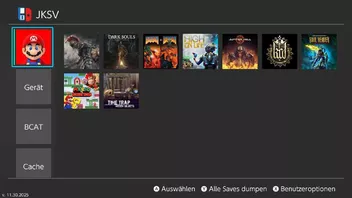
- Textmenü (JKSM 2016) Modus kehrt zurück: Für Fans des ursprünglichen JKSM auf 3 DS unterstützt JKSV nun JKSM-Modus Dabei werden Titel mithilfe von Textmenüs anstelle eines Symbolraster-Arrays aufgelistet.
- Ergänzungen.
- Automatisches Hochladen: JKSV kann nun automatisch Backups auf Ihren ausgewählten Dienst hochladen und von der SD-Karte entfernen.
- Steuerbare Kompressionsstufe: Sie können die Komprimierungsstufe festlegen, die beim Erstellen von Backups mit ZIP verwendet wird.
- Textmenü (JKSM)-Modus: Wechseln Sie zwischen Symbolrastern und Textmenüs zur Anzeige von Titeln.
- Umschaltbare Systemspeicher: Sie können jetzt umschalten, ob das Scannen, Laden und Anzeigen von Gerät, BCAT, Cache und System gewünscht ist. Die Deaktivierung aller verbessert auch die Startzeiten.
- JKSV enthält nun eine Metadatendatei in Backups, die Informationen zum Speichern enthält. Dies verbessert die Genauigkeit und Zuverlässigkeit bei der Wiederherstellung von Speicherplätzen.
- Hinweise zu fehlenden Merkmalen.
- Gerätespeicher mit Benutzern einschließen Wurde noch nicht umgesetzt. Es erfordert einige sorgfältige Überlegungen und Planung.
- Der Dateimodus ist noch nicht verfügbar.
- Das Filtern von Pfaden aus Backup und Löschen ist noch nicht implementiert.
- Zusätzliche Hinweise.
- Die meisten Backups des ursprünglichen JKSV sind kompatibel. Ausnahmen sind Titel, die Speicherdaten erweitern, die nun bei der Neufassung korrekt behandelt werden.
- Das SVI-Format wurde überarbeitet. SVI-Dateien des ursprünglichen JKSV sind mit dieser Neufassung nicht kompatibel.
- Die bereitgestellten Übersetzungen werden alle von AI vervollständigt. Wenn Sie Überarbeitungen haben oder diese beheben möchten, können Sie dies gerne tun!
- Möglicherweise sind noch einige Arbeiten zum Speichern und Verwalten des Cache-Typs erforderlich.
- Beim Umschreiben von JKSV wird nicht dieselbe Konfigurationsdatei wie im Original verwendet. Sie müssen es neu konfigurieren.
Anwendung
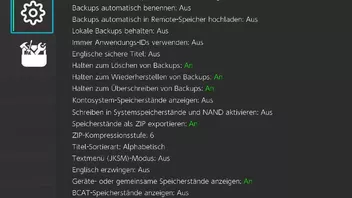
Zunächst sollten die Einstellungen auf die empfohlenen Werte eingestellt werden:
Die Optionen:
"Gerätespeicherstände mit Benutzern einbeziehen",
"Halten zum Löschen von Backups"
"Halten zum Wiederherstellen von Backups"
"Halten zum Überschreiben von Backups"
"Nur einbindbare Titel anzeigen"
"Speicherstände als ZIP exportieren" und
"Geräte- oder gemeinsame Speicherstände anzeigen" auf "An",
alles andere auf "Aus".
1. Spielstände sichern (alle)
a) Auf den entsprechenden Benutzer navigieren und mit  "Alle Speicherdaten dumpen" bestätigen.
Alternativ: Auf den entsprechenden Benutzer navigieren und  für "Benutzeroptionen" anwählen. Dann auf "Alle für den betreffenden Benutzer dumpen" navigieren und mit
  bestätigen.
1.1 Spielstände sichern (einzeln)
a) Benutzer anwählen und mit in die Titelauswahl gehen.
b) Zum gewünschten Titel navigieren und mit bestätigen.
c) "Neues Backup" mit anwählen --> mit "OK" oder "  " bestätigen
Falls die Sicherung auf einer anderen SD-Karte wiederhergestellt werden soll, muss wie folgt vorgegangen werden (Wichtig! Die JKSV Settings müssen auf beiden SD-Karten identisch eingerichtet worden sein!):
1. Den JKSV Ordner aus dem Root der Quell SD-Karte extern sichern
2. JKSV auf der Ziel SD-Karte ausführen und ggfs. Punkt 2.1 umsetzen
3. Den gesicherten JKSV Ordner in den Root der Ziel SD-Karte kopieren
2. Spielstände wiederherstellen (der Restore der Spielstände muss für jeden einzelnen Titel durchgeführt werden)
2.1 Wenn noch keine Spielstände für eine Wiederherstellung existieren, müssen diese erst erstellt werden:
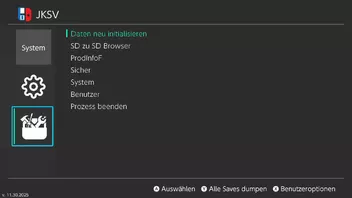
a) Benutzer anwählen und für "Benutzeroptionen" anwählen.
b) Entweder "Speicherdaten für den entsprechenden Benutzer erstellen" oder "Alle Speicherdaten für den entsprechenden Benutzer erstellen" mit anwählen und das nächste Pop-Up Fenster mit bestätigen.
2.2 Spielstände wiederherstellen
a) Benutzer anwählen und mit in die Titelauswahl gehen.
b) Zum gewünschten Titel navigieren und mit bestätigen.
c) Auf Sicherungsdatei navigieren und für die Wiederherstellung anwählen, sowie das nächste Pop-Up Fenster mit bestätigen.
d) Schritte b) und c) für alle weiteren Titel des betreffenden Benutzers wiederholen.
Hinweise:
a) Sollten Spielstände von JKSV für einen Restore nicht erkannt werden, trotz korrekter Anwendung, kann ein Archive Bit Fix über Hekate Abhilfe schaffen.
b) Sollte JKSV beim Start zu einem Absturz führen, kann das Löschen des JKSV Ordners im SD-Karten Wurzelverzeichnis Abhilfe schaffen. Achtung! In dem Fall werden alle Spielstandsicherungen gelöscht!!
Changelog
12.02.2025
- Fixed a crash caused by enabling both Keep Local Backups and Auto-backup on restore.
- Fixed an issue where trashed Google Drive files appeared in JKSV’s backup listings.
- Added a new setting: English Safe Titles.
- When enabled, United States and British English titles are prioritized over the default system language when generating output folders.
- Applet mode has been re-enabled. JKSV will now display a warning indicating that unexpected behavior may occur.
- Keyboard dictionary and suggestions have been re-implemented, along with three new date formats.
- Menu wrapping has been implemented to mirror the original master branch JKSV behavior.
- Updated KO.json by @DDinghoya in #319
11.16.2025
- A fix for uploading to certain WebDAV servers and providers by @soarqin in #316
- Built with the latest libnx.
- Support for cache-type saves has been improved.
- When creating a cache save, you will now be prompted to specify an index and choose the location (NAND or SD).
- A thread-pooling system has been implemented to avoid repeatedly creating and destroying threads.
- A new queued buffering system has been added.
- Remote storage initialization and fetching are now threaded to help reduce boot times.
- A more comprehensive accent and Unicode-to-ASCII conversion table has been implemented.
- This will be the final revision of this code.
- Some output folder names may change again. I apologize for the inconvenience.
- Note: I originally planned to provide a conversion tool, but the release of system update 21.0.0 forced me to prioritize compatibility fixes.
- The Title Information view has been overhauled to display more detailed data.
- Running under applets has been disabled.
- JKSV can now check for and download updates for itself.
- All logic for animations and state transitions has been consolidated.
- Logic for various UI elements has been cleaned up and adjusted.
- FsLib has been updated to address directory listings not being sorted correctly.
09.13.2025
- A bug in string sanitation logic has been corrected that would result in the final character being replaced with a null terminator.
- Non-safe path characters are now ignored instead of replaced with spaces. This prevents duplicate spaces in safe titles and nicknames.
- As a result, some titles may not match their previous output directories. I understand this might be inconvenient, but the change helps keep paths cleaner and more consistent, and it may also improve compatibility with certain WebDAV implementations.
What's new:
- Korean language text has been updated thanks to @DDinghoya!
- State transition logic has been consolidated into a single class.
09.08.2025
- Leere Verzeichnisse in ZIP-Backups bleiben nun korrekt erhalten.
- Verzeichniseinträge in ZIP-Backups werden nun ordnungsgemäß gehandhabt.
- Dadurch wird ein Fehler behoben, bei dem von anderen Programmen erstellte ZIPs möglicherweise nicht wiederhergestellt werden können.
- Der verfügbare Journaling-Speicherplatz wird nun direkt aus Speicherdaten abgerufen, bevor er auf die Standard-NACP-Werte zurückfällt.
- Die Pfadhygienelogik wurde korrigiert, sodass Pokémon-Titel jetzt denselben Ausgabepfad wie im ursprünglichen JKSV verwenden.
- Behebt ein kleines Versehen, bei dem Symbole nicht auf ihre ursprüngliche Größe zurückschrumpfen.
Was ist neu:
- Der Dateimodus wurde implementiert:
- Greifen Sie darauf zu, indem Sie ein Spiel markieren, X drücken und auswählen Im Dateimodus öffnen.
- Zusätzliche Funktionen wie das Durchsuchen verschiedener Dateisysteme auf der Switch wurden jetzt implementiert.
- ANMERKUNG: Der Dateimodus beim Umschreiben funktioniert in einigen Punkten anders als beim ursprünglichen JKSV. Es kann einige Anpassungen erfordern.
- FsLib wurde aktualisiert, um vollständig RAII-konform zu sein.
- Verschiedene kleine Optimierungen und Verbesserungen im gesamten JKSV und seinen Bibliotheken.
08.25.2025
This version of JKSV has been rewritten from the ground up. It shares none of original version's code. The goal of this was to make JKSV more stable, navigable, and maintainable.
- As mentioned, JKSV has been completely overhauled and rewritten.
- C++ features: JKSV now makes proper use of polymorphism, RAII, STL containers, and smart pointers throughout.
- State system: Replaces the old mess of global variables to track state. This alone makes the code far easier to follow and maintain.
- Resource management: No more manual memory management. No more memory leaks.
- C APIs: All C library APIs are wrapped in classes and smart pointers. This ensures proper cleanup and makes the code easier to work with.
- Error logging: Errors are logged with file, function, and line number, making issues far easier to track down.
- Code structure and quality: Overall readability and maintainability have been drastically improved.
- Cached boot.
- Faster startup: JKSV now caches title data to improve boot times. On recent firmwares, Nintendo’s changes have slowed down NsGetApplicationControlData. Caching title information resolves this issue.
- Automatic invalidation: JKSV detects and rebuilds the cache itself whenever new titles are detected. Unlike JKSM on 3DS, there’s no need to manually refresh this yourself.
- Remote storage heavily reworked.
- System overhaul: The entire remote storage system has been reworked from the ground up.
- Expansion: The new design makes it simpler to add support for additional services in the future.
- Important note: Adding support depends on the information a service requires. I’m not handing over all of my personal info just so JKSV can support it.
- Overhauled WebDav code.
- Completely reworked: The WebDav code has been rewritten from the ground up.
- Namespace agnostic: Instead of slicing and splicing namespaces to find XML tags, the new code ignores them entirely. This eliminates unnecessary string allocations and improves compatibility.
- Recursive fetching: Your entire WebDav listing is now fetched and processed recursively on boot, rather than on-demand. This eliminates UI pauses when servers respond slowly.
- Consistency: Changing the output path for a title on your Switch now also updates the folder on your WebDav server automatically. This should have been like this in the first place...
- Instructions for setting up WebDav can be found here.
- Reworked Google Drive code.
- Major cleanup: The Google Drive integration has been heavily reworked, fixing various issues and inconsistencies.
- Full title support: Folder names once again use full UTF-8 titles. This was changed with the previous WebDav implementation and has been reverted.
- New login method: Instead of relying on the Switch’s built-in web browser, JKSV now uses the Limited Input method. You can now log in with your phone or another device instead.
- Instructions for setting up Google Drive can be found here.
- Reworked file handling logic.
- Complete overhaul: All file handling logic has been rewritten from the ground up.
- Bug fix: This addresses a rare issue where JKSV could get stuck at the end of a file transfer.
- Reworked UI Code.
- Complete overhaul: All UI code and elements have been rewritten and fine-tuned.
- Familiar Layout: The interface remains familiar, but everything underneath is completely different.
- Better translation support: The UI was designed from the ground up with translations in mind. In the original, this was just tacked on later.
- Text Menu (JKSM 2016) Mode Returns: For fans of the original JKSM on 3DS, JKSV now supports JKSM Mode where titles are listed using text menus instead of an icon grid array.
- Additions.
- Auto-Upload: JKSV can now automatically upload backups to your selected service and remove them from the SD card.
- Controllable compression level: You can set the compression level used when creating zipped backups.
- Text Menu (JKSM) mode: Toggle between icon grids and text menus for displaying titles.
- Toggleable System Saves: You can now toggle whether scanning, loading, and display Device, BCAT, Cache, and System is desired. Disabling all of them also improves boot times.
- JKSV now includes a metadata file in backups containing information about the save. This improves accuracy and reliability when restoring saves.
- Notes concerning missing features.
- Include Device Saves with Users hasn't been implemented yet. It requires some careful consideration and planning.
- File Mode is not available yet.
- Filtering paths from backup and deletion is not yet implemented.
- Additional Notes.
- Most backups from the original JKSV are compatible. Exceptions include titles that extend save data, which are now handled correctly in the rewrite.
- The SVI format has been revised. SVI files from the original JKSV are not compatible with this rewrite.
- The translations provided are all completed by AI. If you have revisions or would like to fix them, feel free to do so!
- Some work may still be needed regarding cache type saves and handling them.
- JKSV's rewrite does not use the same configuration file as the original. You will need to reconfigure it.
Extra, extra notes:
- Uses FsLib, a C++ wrapper library I wrote around 3DS and Switch FS calls.
- More control: FsLib allows me finer control over file operations.
- For example, if the final size of a file is known ahead of time, FsLib can skip redundant calls to extend the file during writes. This speeds up file transfers.
- Paths are standardized upon construction to ensure compatibility with the Switch's FS.
- Improved error handling and logging: Every operation returns whether it succeeded. If not, FsLib records an internal error string with the location and error code for easier debugging.
- Because of this, the option Use FS Commands Directly has been removed as it serves no purpose anymore.
- More control: FsLib allows me finer control over file operations.
- Uses SDLLib, a C++ wrapper library I wrote containing reusable functions all of my projects share.
- Central Texture Manager: All textures are now loaded, tracked, and freed by a single manager, eliminating duplicate handling.
- Surfaces & Textures wrapped: SDL Surfaces and Textures are wrapped in smart pointers or classes, ensuring proper cleanup.
- Improved text handling: Text handling has been reworked and improved compared to the original JKSV implementation.
11.05.2024
- JKSV's default configuration settings have been updated to use ZIP as the default backup option instead of JKSM's original unpacked folder format.
- This can be changed by scrolling down to the end of the user selection menu and opening the settings menu if you wish to use folders instead. Note that ZIP offers higher compatibility with games that use UTF-8 file paths and other oddities that the save containers allow that the SD card does not. Folders allow easier access to the files themselves.
- If you've been using JKSV for a while, chances are your current configuration file will override this change. If you would like the best compatibility possible, I recommend toggling the "Export Saves to ZIP" option to on from here on out.
- With this release, I've included a ZIP with my preferred configuration when I use JKSV. Simply unzip it to your SD card and you're good to go.
- JKSV's configuration file is now written upon toggling or changing an option instead of at exit or cleanup. Too many people aren't aware you should be exiting JKSV with plus instead of the home button to allow it to save your configuration and cleanup.
- Updated translations for:
- Traditional Chinese by @qazrfv1234.
- Italian by @Pf-16
- Korean by @DDinghoya
- Updated WebDav instructions thanks to @impeeza
- I have written a guide to JKSV's settings menu and what the options do here.
08.06.2024
- Fixes empty file names on certain Webdav servers.
- Uses path safe titles for Webdav servers.
07.18.2024
- (Experimental?) WebDav support thanks to @rado0x54. Instructions for using and setting it up can be found in Remote Instructions.
02.23.2023
This release contains a fix for the system font issues caused by the recent Switch update thanks to @SciresM.
It also forces me to post a release containing my in progress Google Drive code. Please note that while it works, I never had time to add and complete automatic upload/patching code. Uploading needs to be manually done for now. I promise I'll be back someday to finish it. You can read the instructions to set it up here.
There may be other changes I made in the past two years. If there are issues, report them and I'll do my best to figure them out when I can.
09.01.2021
- Adds Traditional Chinese support back thanks to @qazrfv1234
- Fixes output paths/title definitions not being read after initial import of old configurations
- Separates trash bin into sub folders so trashed backups aren't impossible to find.
08.31.2021
User Changes
- All users on the system are now loaded regardless of whether they have save data or not.
- Pressing X while user select is active will open the user options menu. The highlighted user is the target.
- Dump All For X dumps all saves for that user
- Create Save data opens a sub menu and creates save data for the target user.
- Cache saves need an index number and to be expanded before import. I'll be working on automatically doing this later.
- Create All Save Data creates all save for every title found on the system
- Delete All User Saves Deletes all save data for the target user
Title Select Changes
- All titles should be loaded now. Even ones that haven't been run yet.
- Some options and features have been moved to a sub menu:
- Information is the same information that was previously displayed when selecting a folder.
- Blacklist adds the highlighted title to your blacklist
- Change Output Folder changes the folder save data for the targeted writes too. This is the same as using title definitions is previous versions. The folder is renamed for you.
- Open in file mode is the same as using file mode in previous versions. Minus exits file mode for now.
- Delete All Save Backups will clear all backups for the target game.
- Reset Save Data will reset you save as if the game was never run before.
- Delete Save Data will delete the save data just as in Data Management
- Extend Save Data will increase the storage size of the target game.
Folder Select Changes
- Folder selection is no longer a separate screen, instead just a slide out menu.
Settings changes
- Empty Trash Bin empties the trash folder. Trash Bin feature can be enabled and disabled further down this menu.
- Check for Updates checks for the extremely rare JKSV update.
- Set JKSV Save Output Folder sets the folder JKSV writes saves to.
- Edit Blacklisted Titles allows you to finally remove titles from your blacklist without editing text files.
- Delete All Save Backups clears all save backups for all games. Basically a reset without losing configuration or folders.
- Animation Scale changes how fast the new UI animates. 1 is instant, 8 is extremely slow.
- Other settings remain the same. Legacy config and files should be loaded and removed by JKSV without any intervention needed from the user.
Under the hood stuff
- Even if Export to ZIP is disabled, adding .zip to the end of a file name will force compression to be used. .zip has been added to the dictionary suggestions. For people who only want to use it for certain titles.
- A trash bin folder has been added. If trash is enabled, deleted backups will be sent to the _TRASH_ folder instead of being permanently deleted. This is likely to change in the future to separate different titles.
- Various functions are threaded now to allow the UI to update the screen.
- JKSV will no longer export or import empty zips, folders, or saves. This fixes a crash when trying to import empty zip files, doesn't allow saves to be accidentally wiped anymore, and cuts down heavily on empty mass backup files and folders.
- Headers for zip files have been fixed.
- Log file is no longer kept open allowing FTP to access JKSV's work directory while it's still running.
- Backup JKSV Folder in extras now trims the paths in the ZIP and ignores anything that isn't a save folder.
- Dictionary suggestions and predictions have been fixed thanks to @zand who caught a buffer overflow issue I missed.
- Journal space is used when deciding when to commit save data.
Notes and future plans/improvements
- Actual icons instead of generated ones for system users
- Possibly cloud backup
- Master lists of title definitions to replace title ID folders which will be downloaded and customized for the user.
- This release is nro and English only. I need to find where I put the stuff to build the nsp and old translations are completely incompatible with this release.
08.01.2021
- New Japanese translation provided by @yyoossk
- New Brazilian Portuguese translation provided by @ortega1cba
- Fixes line breaking issues when Traditional Chinese is used.
- Has an option to override the system language so English is used regardless.
- Uses an earlier version of the SDL2 graphics file and font glyph cache written for the new UI
Known Issues:
- The Brazilian Portuguese translation has strings that are longer than the settings menu should hold, but this doesn't cause any serious issues.
This will be the final release using the old master branch code. So, it will also the last to have the text UI toggle.
05.17.2021
The main reason for this update is to fix issues restoring New Pokemon Snap saves. Any new issues caused by the updated code to handle this can be reported. Other things since last time:
- Updated Traditional and Simplified Chinese translation files.
- New sort options: Games can be sorted alphabetically, by play time, or by last played.
- Paths to directories and files can be filtered from being backed up and deleted on restoring saves.
- Create a file named pathFilters.txt in the folder of the game you wish to filter files from. Add a file or folder for each line. For example, sv:/file.ext or sv:/directory for folders.
- Various other tweaks.
06.07.2020
- Traditional and Simplified Chinese translations are included thanks to Leo and JamePeng
- Any English strings leftover are my entirely my fault, but most of the UI is translated thanks to these two.
- Output folders used by games can be set by the user by creating a text file named titleDefs.txt and adding lines such as 01006C300E9F0000 = "Dragon Quest XI S". This is to help with folders that default to title ID because of unicode characters.
- Data loading has been reworked.
- All save data types should be supported now. The last three (System BCAT, Cache, and Temporary Storage) will only show if any data is found for them.
- Blacklisted and unmountable titles are skipped sooner in loading, preventing JKSV from loading or creating icons for them.
- Fixed a memory leak where user icons weren't freed if titles were reloaded.
- JKSV now has the option to backup and restore to and from ZIP archives.
- JKSV can now write its own working directory to a ZIP archive that can be easily backed up and stored somewhere. (This is in the extra's menu).
- NSP build is back for people who want it.
05.20.2020
- Hold time for confirmation is shortened. Options are added to completely disable it depending on what you want.
- Minus and ZR are swapped for Options and Extras on the user selection screen
- Exploring the romfs of the title taken over by the homebrew menu is back in the extras menu.
- Save Data can be erased from your system in the title selection screen like in the switch's settings menu. Holding A is required to confirm this.
- A custom path for JKSV can be used by creating a file named jksv_dir.txt in your switch folder and typing the path you want to use. This must end with a /. For example, sdmc:/switch/.JKSV/ will make JKSV use a folder in the switch folder that is hidden from the hbmenu.
- Dump All can now be exited early by holding B until the current file is finished.
- The User selection screen has been changed to only show the maximum number of users instead of the title select's max of 32.
- Certain strings can be translated with en-US.txt in JKSV's romfs. Naming this file trans.txt and placing it in JKSV's working directory will make JKSV load it instead of the default US text by myself. This is not 100% complete yet. Please wait if you're interested in making a translation to be included with JKSV in the future.
- Various new options.
- Touch controls have been removed. Sorry.
04.10.2020
I wasn't planning this, but I've seen way too many people overwrite their ACNH saves with BCAT data and losing their progress.
Added Options Menu to User Select
- Option one adds Device Saves to accounts when on. This is disabled by default.
- Option two automatically creates a backup before restoring any save. These are automatically named starting with AUTO. This is enabled by default.
- Option three is a small CPU overclock. This is to keep the text based UI mode running a bit smoother for people. This is disabled by default.
- Deleting and Restoring saves now requires the user to hold A to 100% confirm they are sure they want to continue
- Users can now be changed in the title selection menu by pressing L or R.
- Titles can now be favorited and pushed to the top of the title selection by pressing minus.
- stdio is now used instead of C++ fstream and cuts down size about 200KB.
- Various changes and fixes.
This is a prerelease. Parts of the UI's touch controls are not working correctly at the moment. I just don't want people accidentally losing their progress if I can help it.
03.21.2020
- Dev. Sv has been renamed Device and is moved higher up in the user select
Just a quick update for convenience since I'm going to be ripping apart Freebird's GUI and adapting it to JKSV as much as possible. I don't know how long this might take.
01.06.2020
Sort of emergency release because of HID changes. Bug reports are appreciated. Changes since last year:
Everything is enabled. You no longer need to hold a combo to enable:
- System Saves
- BCAT
- Device Saves
- Generic icons are generated for things without icons instead of using a big '?'.
Updated for latest libnx
- ROMFS opening code has been removed until I have more time to remake it.
- Hopefully text mode loading is fixed
01/08/2019
- New Icon thanks to @igniscitrinus
- NSP Build
Extras menu is now accessible by pressing minus instead of button combo
- Extra option added to delete downloaded update data and reboot console
- Terminate Processes by titleID - For advanced users to explore normally unopenable system save data archives
- Layout has been updated to resemble official Switch menus better
- Graphics file updated for new libnx
- Added function to count directory sub dirs, files, and total size. Usable by selecting properties in Adv Mode on a directory.
- Switch Software Keyboard and dictionary support.
09/15/2018
This release adds:
- Bis storage exploration via Adv. Mode. Pressing ZL, ZR, and Y will activate this and take you to a different menu. All of the standard Adv. Mode options work here, but copying back to bis storage is disabled.
- NAND Backup. I added this to experiment with FsStorage and stress test some things with larger files a week or two ago. I wouldn't use it as your only way to backup you NAND, but it is there.
This is a relatively short list, but I am going to be busy and am not sure when I'll get around to OpenGL or another release.
08/26/2018 Pre-release
This is probably going to be the last Pre-release/beta release. This includes:
- Rewritten, more stable text-wrapping
- Every system font is now loaded
- Adds title blacklisting. Pressing X in the title select will add the selected title to a list that prevents it from being shown. This is located at 'sd:/JKSV/blacklist.txt'
- File size is now displayed inside the progress bar
- Other small tweaks
08/05/2018 Prerelease
This pre-release update:
- Should fix games with non-ASCII titles. They will now default to their title ID.
- Tweaks some things related to strings.
- Adds back the 3DS shortcut of holding L or R while selecting new to just auto name the backup
- Titles are now sorted a bit better by using UTF8
- The input guide in the bottom right corner can now be used as button presses for touch controls. I still don't consider touch controls 100% complete
- Various UI tweaks and changes
07/21/2018
Touch controls are still incomplete, but this is completely usable with standard controls. This prerelease uses the newer UI style and can be switched to the older one on the user select screen by pressing X.
6-25-2018
JKSV still needs some work, but I've decided to add another pre-release since there has been a lot of progress and bug fixes:
- Text wrapping has been more-or-less fixed. Though, some minor bugs may remain
The keyboard still needs to be improved a bit. It can be controlled using the touchscreen or controller.
- Left Stick caps letters
- Y is backspace
- X is space
- Plus is confirm
I have added "Adv. Mode", or a more advanced option to the folder menu. Pressing Minus will open a mini file explorer with the selected game's data on the left and your SD on the right.
- A selects a folder an opens it
- B goes back up a directory
- X opens a small menu of options to move files between devices. The device currently selected is written at the top of this menu.
- ZL and ZR change which menu is currently being controlled.
- I have moved the 'JKSV' folder from root to the switch folder and named it '.JKSV'. This is to prevent clutter and hide it from the hbmenu.
Unfortunately, until I get my usual testers in on this, I will probably not feel confident enough to make a non pre-release. That's just how I am.
6/15/2018-beta
Early release. Usable, but:
- Text wrapping is broken
- No cache currently - Still planning how this will work.
- Keyboard still needs work.
You're using this at your own risk. I have personally had zero issues, but I can't possibly guarantee that will be true for all.