


uLaunch
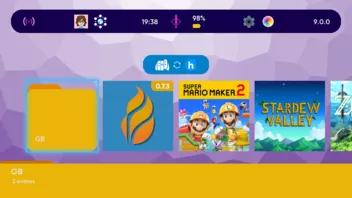
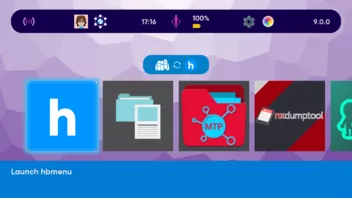
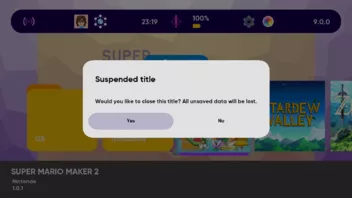
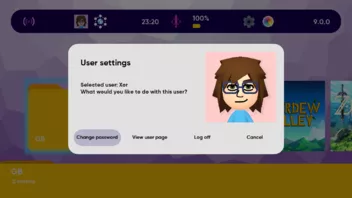
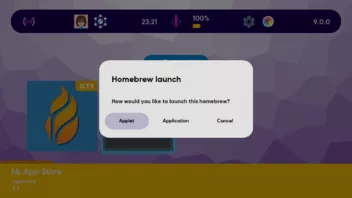
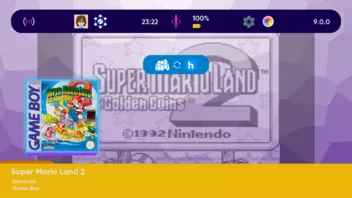
Dies ist ein Ersatz für das Original Nintendo Switch Home-Menü! XorTroll, der Entwickler von Goldleaf hat ein alternatives Home-Menü für die Switch veröffentlicht. Um in den Genuss des neuen Menüs zu kommen, müssen die Ordner atmosphere und ulaunch aus dem Release in den Root der SD-Karte kopiert, und die Konsole rebootet werden.
Changelog
1.2.5
- Recompiled with latest libnx changes and with Atmosphère v1.11.2 (support for 22.5.0)
1.2.4
- Recompiled with latest libnx changes and with Atmosphère v1.11.1 (support for 22.1.0)
1.2.3
- Recompiled with Atmosphère v1.10.2 support (21.2.0)
- All keyboards are now properly supported when creating a new folder or changing the console nickname
1.2.2
- Recompiled with Atmosphère v1.10.1 support (21.1.0)
- Moved to new NS commands for proper icon/NACP support
1.2.1
- Recompiled with Atmosphère v1.9.1 support (20.1.0)
- Introduced a new game icon/NACP caching system to circumvent issues with 20.x icon/NACP loading slowdowns:
- Icon/NACP data is stored in-memory in uSystem, which is why uSystem's memory footprint increases from 12MB to around 40MB: this should, in theory, allow cache for up to 200 installed games. If anyone happens to have more than this amount installed, then (even though this is already an absurd amount) feel free to open an issue to request more cache memory (we could theoretically use up to around 50MB)
- Don't worry, since this shouldn't impact anything: we are already using less memory than the base HOME menu (which is around 50MB) even considering the resulting size of the uSystem binary, we have been for years and still are, so (as always) things will be the same as with regular HOME menu, maybe even smoother
- Fixed a bug causing major slowdowns for users with many games (even with around 10 it was noticeable), also related to 20.x changes, where a given command was called every frame (for every app) and made uMenu slow down whenever too many games were in view in the main menu (the value is now read just once when the apps are loaded)
- Fixed a dumb bug where uMenu would only try to cache the active theme if it was not cached yet... while uSystem was wiping ALL cache every reboot, thus the theme was being cached every boot
- Fixed a weird bug where (sometimes?) the default theme would be considered outdated
1.2.0
Before anything, as always: new language texts were added to reflect the changes below, and other minor internal fixes were made (which probably have very little impact on the user experience)
- Compiled with latest libnx changes and Atmosphère 1.9.0, supporting up to firmware 20.0.1
- Fixed issues where some theme files were not properly cache'd and thus would not load
- Now, uLaunch's applet processes (uMenu, aka the visible HOME menu, and uLoader, aka any homebrew launched as applets from uMenu) are loaded over the album applet by default
- Previously, uMenu would run over eShop and uLoader over parental controls by default... which was a rather arbitrary choice made years ago
- Now uSystem's code has been adapted so that uLoader, uMenu and other used applets run over the same applet type (now uMenu, uLoader and the regular album all run over the album applet process) since that would have caused issues in prior versions
- This might be speculation, but running our stuff over album might probably be safer than using something like eShop

- The default string (if all language files failed to load) is now <unknown> instead of an empty string.
- Invalid, previously selected homebrew takeover applications are reset (if you selected an application as homebrew takeover and then deleted the application, uLaunch would previously crash trying to launch homebrew over it,but now such invalid setting is automatically cleaned)
- The config is now unique per emuMMC or sysMMC!
- This means that emu/sysmmC will have independent configs (yeah, that means different themes!)
- uLaunch will automatically convert the global settings so far into sys/emu settings: they will be the same, copied from the global one, but from now on any change will only be made on the current MMC (sys/emu)!
- A minor homebrew entry cache bug was fixed, now if a homebrew is updated while uLaunch is active (homebrew that auto-updates, sending via hbmenu's NetLoader) it will be cache'd accordingly (prior to this, cache loading would fail and it would show as an invalid "???" entry)
uMenu
- When pressing B on a dialog, the cancel button is briefly focused before fading out, to show more clearly that the dialog was cancelled
- The issue where uMenu opening applets (the keyboard, user page and so on) would show previous applet graphics in the background is finally fixed!
- Added support for button remapping and controller updating! These are now additional options in the "Controllers" special menu entry.
- Suspending applets has now a similar fade-out effect as suspending applications, which looks really nice IMO
- Similar fixes were done when launching applets over uMenu (keyboard, controller) where previously a dark background was shown, now (as with regular HOME Menu) the uMenu screen is shown blurred in the background (little details that make everything nicer!)
- When launching applets, a fade-out effect is done with the underlying theme color (light or dark) to make a nicer transition from out colorful themes to the minimalistic dark/light style that applets use regardless
- Added additional logging for future troubleshooting of load times
- Minor fix when showing the keyboard: now the cursor is properly initialized at the end (if there was some initial text, like when changing the console nickname)
Main menu
- Menus are lazy-loaded now (only loaded when you get into it), which might improve performance (marginally?)
- Starting uLaunch doesn't show the lockscreen (if enabled), it goes directly to the startup menu as usual
- Some UI texts (title and author/version texts in main menu) no longer extend beyond their limits if too long (a new simple animation system is used display them)
- The long-standing audio-sysmodule crashes when suspending specific games is finally fixed! For technical details, check the repo README regarding building.
- Time and date are only re-rendered when the values actually change (again, marginal performance improvements?)
- Games that need an update are properly treated now (sometimes they can be launched and sometimes not, both cases are distinguished now)
- A simple but usual animation is present in the time text, where the dots ":" between minutes and seconds flicker occasionally (also in lockscreen menu)
- Special homebrew entries (hbmenu and uManager as of now) cannot be added again, since they are made to be always present in the menu (that is why they're special :P)
- A dedicated error message is shown when a theme fails to load (and the default theme was loaded because of that), or when a theme is outdated (but still was loaded)
- Fixed SFX being played constantly when spamming L/R for moving pages in the menu (now SFX only plays when it moves)
- Fixed annoying graphical behavior when spamming +/- for resizing the menu
- If selecting a game that is the homebrew takeover, the option to set as homebrew takeover is no longer shown (because it was pointless :P)
- Now pressing the HOME button inside a folder first rewinds it to the start, then a second press gets it back to the HOME menu root (previously it directly went back to the root menu)
- Menu layouts are now unique per user and sys/emuMMC! uLaunch will automatically copy the current (global) menu to all users, and from then, any menu modifications will be unique for the user
- Fixed a bug where renaming a folder would not update the folder name text over the folder icon
- Game icons are no longer cache'd by uLaunch itself: the console already has its own cache system, and simply relying on it (like regular HOME Menu does) has always been faster than loading our cache'd icons from the SD card (just that it took me a few years to really notice); another consequence is that, when changing language in the console, icons will properly reflect the corresponding language (which previously did not always work as expected)
- Account/user icons are also no longer cache'd (for more or less the same reason as with games) hence when creating a new user / editing a user's icon, the change is properly reflected in the menu
Settings menu
- The setting that checks for system updates no longer freezes when its waiting for connection (a time-out prevents it now).
- The movements between setting menus were rewritten, now doing a much more smoother move (you can also move with ZL/ZR and left/right D-pad as well)
- New uLaunch settings were added:
- uLaunch version
- Audio service used by uLaunch
- Reset application used for homebrew takeover (there was no way to do this previously)
- Launch homebrew as application by default (disabled by default, only takes effect if a takeover application is selected)
- Two new submenus are introduced... for Bluetooth audio device support! One submenu for (dis)connecting/unpairing already paired devices, and another one for searching for new devices
Themes
- New theme version number: 3
- uLaunch is designed to try to make themes as backwards-compatible as possible, so previous themes should work fine regardless
- The extension for themes is now .ultheme instead of a plain .zip (it is still a ZIP file in contents, though)
- uLaunch itself will rename valid .zip themes in the themes directory automatically

- uDesigner will support loading .zip and .ultheme themes, but will save them as .ultheme from now on
- uLaunch itself will rename valid .zip themes in the themes directory automatically
- EntryIcons and OverIcons should be provided on the basis that menu icons are 384x384 size in the worst case (previously it was recommended to consider 256x256).
- Text entries can be configured to have a maximum width, and animate their display otherwise (see UI text correction above):
- Using clamp_width, clamp_speed and clamp_delay options
- New settings menu SFX was added: SettingMenuMove.wav
- New main menu SFX was added: MenuIncrement.wav and MenuDecrement.wav
- Now, a version of the default theme with DSi/Wii/3DS BGM/SFX will be included in the release! You can now download it and experience the default theme in a more immersive way
Default theme
- The main menu top part was reorganized to show game titles in a more convenient way
- Icons were moved to the right part
- The background colors (unique for app, folder, homebrew, etc) were changed to more visually appealing ones
- Updated EntryIcons, OverIcons and QuickIcons to reflect the maximum 384x384 size in icons. In some of them, the base icon design / colors were changed to more fitting ones
uSystem
- Improved code for detecting added or deleted content
1.1.0
First of all: Atmosphère v1.8.0 (up to firmware 19.0.1) support
Disclaimer: known issue
This release ships with a known (minor) issue: the newly introduced game detection (gamecard, corrupted and more, see below) also misclasifies some games as "needing an update", and while it doesn't prevent from launching them, the corresponding icon is incorrectly displayed. I still need to figure out the way regular HOME menu detects updated titles 
Menu
- Games which are installed within uLaunch now launch fine for the first time, no longer requiring to revert to regular HOME menu for that initial launch
- Italian, French and German translations
- Lockscreen support! It can be enabled/disabled in settings
- A new special entry for amiibo settings was added
- Folder names are displayed now over the folder icons (like old uLaunch did)
- Games are now detected in a much better way:
- Corrupted games are detected like the regular HOME menu, allowing for the same data check process... but in the background, while the regular HOME menu forces it to be active
- Gamecard titles are recognized and properly shown
- (Most) games which cannot be launched are recognized and properly shown (see known issue above)
- Added special checks to ensure all special entries (user page, controller options and so on) are present in the menu
- The delay time after adding a homebrew / after a crash was made shorter
- Minor bugs where fixed when adding a new homebrew entry to the menu
- Fixed some issues with custom menu entries, where some JSON fields were not working if other fields were not set
Settings
- Settings were reorganized and extended with a few previously unimplemented options (and there are more to come), these are the changed/added entries:
- Console language (reorganized in a nicer way)
- System update status
- Console region
- Primary album storage
- Lockscreen enabled (uLaunch-specific)
- Handheld / console sleep time
- Sleeps while playing media
- Wakes at power state change
- Battery serial / lot
- All these were organized in various menus (uLaunch, system, screen and so on)... not a lot of new ones, but slowly extending the supported settings
Themeing
- Introduced a new special entry for amiibo options, with a new icon at ui/Main/EntryIcon/Amiibo, ui/Main/QuickIcon/Amiibo and a dedicated sound effect at sound/Main/OpenAmiibo.wav.
- Settings got reorganized, now having menu_text and submenu_text fields (info_text is unused now) and its own input_bar, with background at ui/Settings/InputBarBackground
- Due to better game detection, the following over-icons are introduced in this release:
- Main/OverIcon/Corrupted
- Main/OverIcon/Gamecard
- Main/OverIcon/NeedsUpdate
- Main/OverIcon/NotLaunchable
1.0.0
General
- The menu entry system was completely remade:
- Cleaner grid-like system, deeply inspired by the 3DS menu (and partially DSi/Wii menus as well), easier than ever to navigate and customize.
- Homebrew and applications are no longer split in separate menus: the menu initially contains all applications, hbmenu, uManager (check below) and other special entries (user page, settings/themes...), and homebrew entries may be easily added in the menu (or they can always be accessed via hbmenu, of course)
- Support was added for detecting when the gamecard fails mounting (even displaying the result, something the original HOME menu doesn't do).
- Support on SD removal was improved.
- Now using arc to neatly organize result codes and display their names.
- All uLaunch components now generate logs (cleaned every reboot) which can be really helpful for pinpointing any problems.
- Translations are provided for additional languages: Spanish, Korean, Brazilian Portuguese (those volunteered by translators)
- If you'd like to add new translations or improve existing ones, feel free to contribute!
- As always, all libraries were updated to their latest releases (therefore, this works with latest Atmosphère).
- Many other internal bits of the code were improved or straight up redesigned.
uSystem
- Basically many internal changes to reflect changes in the other parts of the project more noticeable by the end user.
uLoader
- Implemented support to use uLoader as a homebrew chooser, thus now being able to return the homebrew the user selected via hbmenu instead of launching it.
- Minor changes reflecting more closely the logic actual hbloader follows, probably fixing minor issues.
uMenu
- Changes relative to the new menu:
- Several options previously placed elsewhere (user page, uLaunch settings/themes, controllers menu...) are now actual menu entries, making the UI cleaner overall.
- Mii editor is now accessible from both the entry menu and the quick menu.
- Folders are back, and better than ever! Subfolders, sub-subfolders, etc. can be created like before, while the new menu grid-like layout makes moving entries inside/outside folders more intuitive than ever.
- Major graphical improvements aside from the new menu:
- All assets/logic were upgraded to 1080p, thus no longer having lower quality on TV (another thing the official HOME menu doesn't have).
- Menus are highly themeable now, since more attention was dedicated to little customizable aspects.
- The quick menu can now only opened with ZL/ZR (L/R are used to nagivate through the main menu), and a mii editor option was added back.
- The web browser URL input dialog starts with https:// as default for simplicity.
- There is no longer a separate homebrew menu, instead homebrew entries are added via the new uLoader mechanism.
- Inputs are now nicely shown in an input bar right above the entry menu.
- Several menu transitions were made nicer, fading into the theme background instead of a black screen.
- Some basic checking is done on whether titles are launchable in the first place (rather than trying to launch them, failing and reopening uMenu with an error dialog)
- Increased internal menu memory from 176MB to 296MB, thus allowing loading better quality theme assets while everything else should (in principle) work fine.
Themeing: uDesigner
Themes have changed a lot: this version introduces a new version of the theme format, comprising both minor changes and a LOT more customizable stuff, to the point where all the changes are too long to be listed here.
- The new default theme has blue as its overall color and almost entirely brand new assets.
- Themes are now distributed as ZIP files.
- The themeing wiki has been rewritten covering everything about creating themes.
From all this, it follows that old themes are far from compatible (not only differences in format/files, but also on the resolution since we are 1080p now!), so any old theme must be reworked manually. Regardless, the new themeing is more customizable than before, opening many more opportunities for any creative minds out there.
Along these lines, an (experimental) official theme editor is finally here: check uDesigner!
- The wiki has also been rewritten, covering every relevant detail. Wiki pages are the perfect documentation for those who will make themes manually as well as those using the (experimental) editor.
uManager
This new release introduces uManager, a brand new homebrew app to control uLaunch's functionality!
Manually tinkering files will no longer be necessary (aside from weird cases, of course).
- Automatically enable/disable uLaunch
- Update uLaunch to the latest GitHub release
- Reset the menu layout / uLaunch's generated image cache (might come useful if something happened to break)
uScreen (formerly uViewer)
uViewer was replaced by uScreen, a brand-new (Java) tool for USB screen capturing, where its functionality is the same overall.
Remarks
Note that many other not-too-complicated features could've been added into this release: more system settings, menu entries for amiibo options, per-user theme options, important application checks that the official HOME menu does (needed updates and corrupted data)...
Features like these will (hopefully) be tested and implemented on future releases, but too many major changes were already waiting to be in a new release (for those unaware, this release's work is the result of combining features of several years of half-finished rewrite attempts) and I was not risking losing motivation again because of constantly expanding the next release's goals.
In other words: enjoy by best work despite still sucking at UI design
v0.3.8
- Everything was compiled with the latest libraries, meaning proper Atmosphère 1.7.0 / system 18.0.0 support among other things
v0.3.7
- Everything was compiled with the latest libraries, meaning proper Atmosphère 1.6.2 / 17.0.1 support among other things
v0.3.6
uLaunch
- Everything was compiled with the latest libraries, meaning proper Atmosphère 1.5.5 support among other things
uDaemon
- Fixed an annoying bug which might cause uLaunch to crash randomly when booting
uViewer
- No changes (therefore no new release binaries)
v0.3.5
uLaunch
- Updated for latest Atmosphere (v1.5.1) and libnx
- Fixed support for certain games, like Nintendo Switch Online titles
uViewer
- No changes (therefore no new release binaries)
v0.3.4
Again nothing new, just recompiled with latest libnx and Atmosphere, which was needed for the latest Atmosphere release (v1.3.1)
Again, since were there no changes at all, no uViewer binaries are provided
v0.3.3
- recompiled with latest libnx and Atmosphere, which was needed for the latest Atmosphere release
v0.3.2
uLaunch
- Most of the code was rewritten or cleaned up, which might mean slightly faster load times, etc.
- Reinstalled/never launched titles can be launched properly (until now, they had to be launched first on regular qlaunch in order to work)
- Other minor internal changes, fixes, etc.
uMenu
- Updated with last libnx, Plutonium and Atmosphere. This (mostly Plutonium changes) might also slightly better performance.
- Atmosphere's info is shown now along with the system firmware (like with regular qlaunch)
uViewer
- No changes (not providing new release binaries)
v0.3.1
uLaunch
- Compiled with latest Atmosphere libraries, effectively supporting up to 1.1.1 and 13.0.0 firmware
- Slightly reduced the main menu's memory size from 192MB to 176MB. Previously, certain applets would crash due to lack of memory (for instance, swkbd when editing a user's name on the user page), and thanks to this memory reduction these issues are fixed now.
- Fixed a bug where launching a title when another one is opened would fail due to not waiting until the opened title actually exits.
uViewer and RetroArch plugin
- Nothing was changed, only the version number was updated.
v0.3
uLaunch
- Updated with last libnx and Atmosphere.
- Now, instead of always overriding certain applets (if you had uLaunch on your SD), uLaunch makes use of ECS to launch its processes over a certain applet, so that the applet can be used normally when the process isn't launched.
- The internal comunication system between uLaunch's processes has changed internally and made more fast and efficient.
- Several bugs/issues with older versions were fixed.
USB support
- USB support is back (it was temporarily removed the last release due to weird technical issues)
- USB now supports an alternative system, which is available under certain circumstances (having patches enabling it being on >10.0.0) and which is significantly faster.
uMenu
- When launching homebrew as applications, uMenu won't make use of the internal flog system application it used to use (which might have been risky for potential bans). Instead, making use of ECS (mentioned above), after a donor title has been selected by pressing up, homebrew can easily be launched over that application like normal Atmosphere does. Note that you won't be able to launch homebrew over an application unless you select that application as the donor application.
- HOME menu pressing is properly supported on the different menus. For instance, pressing the HOME button inside the settings menu will make it return to the main menu.
- The default theme design was reworked, giving it a more dark/purple-ish style, in order to make it more uniform and consistent with the project's logo.
uViewer
- The RetroArch entry creator plugin was updated to work with the latest RetroArch installation.
v0.2.1
- Added support for latest Atmosphere, libstratosphere and libnx, fixing potential bugs they all could have had.
USB viewer
- USB viewing has been force-disabled for this version, since it is completely broken.
Main menu
- Fixed a bug where homebrew couldn't be launched from main menu, even in applet mode, when there is an application suspended.
- Added the option to rename folders by pressing X on the main menu (with the folder selected)
v0.2
Main menu
- Added a new way to open menus without touchscreen: presenting the quick menu! Just hold L/R-stick, then move it while being held to select a menu, leave the stick and profit!
- Changed the web browser touchable menu item with the controller applet one, for what it's worth.
Settings menu
New settings were added:
- Console information upload (enable/disable)
- Automatic titles' download (e/d)
- Console auto-update (e/d)
- Bluetooth (e/d)
- 3.0 USB (e/d)
- NFC (e/d)
- Wireless LAN (e/d)
- MAC address
- Serial number
- Added controller menu applet (as a menu touchable icon, as mentioned above) support to change/manage players and controllers!
- Added album applet (as part of the aforementioned quick menu) support to view your captures!
- Added a power menu (as part of the aforementioned quick menu) to quickly power off, reboot or sleep the console!
QForegroundViewer has been refactored into a major application: uViewer!
- New entry creator menu (custom entry creator to be accessible from main menu), customizable with plugins!
- This includes a custom RetroArch-themed DLL plugin, easily loadable by uViewer, to make ROM forwarding really easy!
- Added a new way to open menus without touchscreen: presenting the quick menu! Just hold L/R-stick, then move it while being held to select a menu, leave the stick and profit!
General
- Custom icons in entry JSONs can now be used with normal titles too, not just homebrew.
- Custom name/author/version texts in entries are no longer restricted to 511/15 characters.
- Certain parts of the code/functionality were slightly improved (speed might be slightly faster in certain laggy moments)


